How We Laser-Cut Our Homepage Out of Blender Renders
Three devices, gold wireframes and scale-model figures, built in Blender by an AI agent and animated without WebGL. Plus the shadow bug that took four attempts.
The new LumiVerse homepage opens with a laser. A beam leaves the red dot in our logo, splits into four, and traces a device out of thin air in glowing gold lines. A second sweep cuts it into a real object with one of our products on the screen. It holds for a few seconds, dissolves, and the next device is cut.
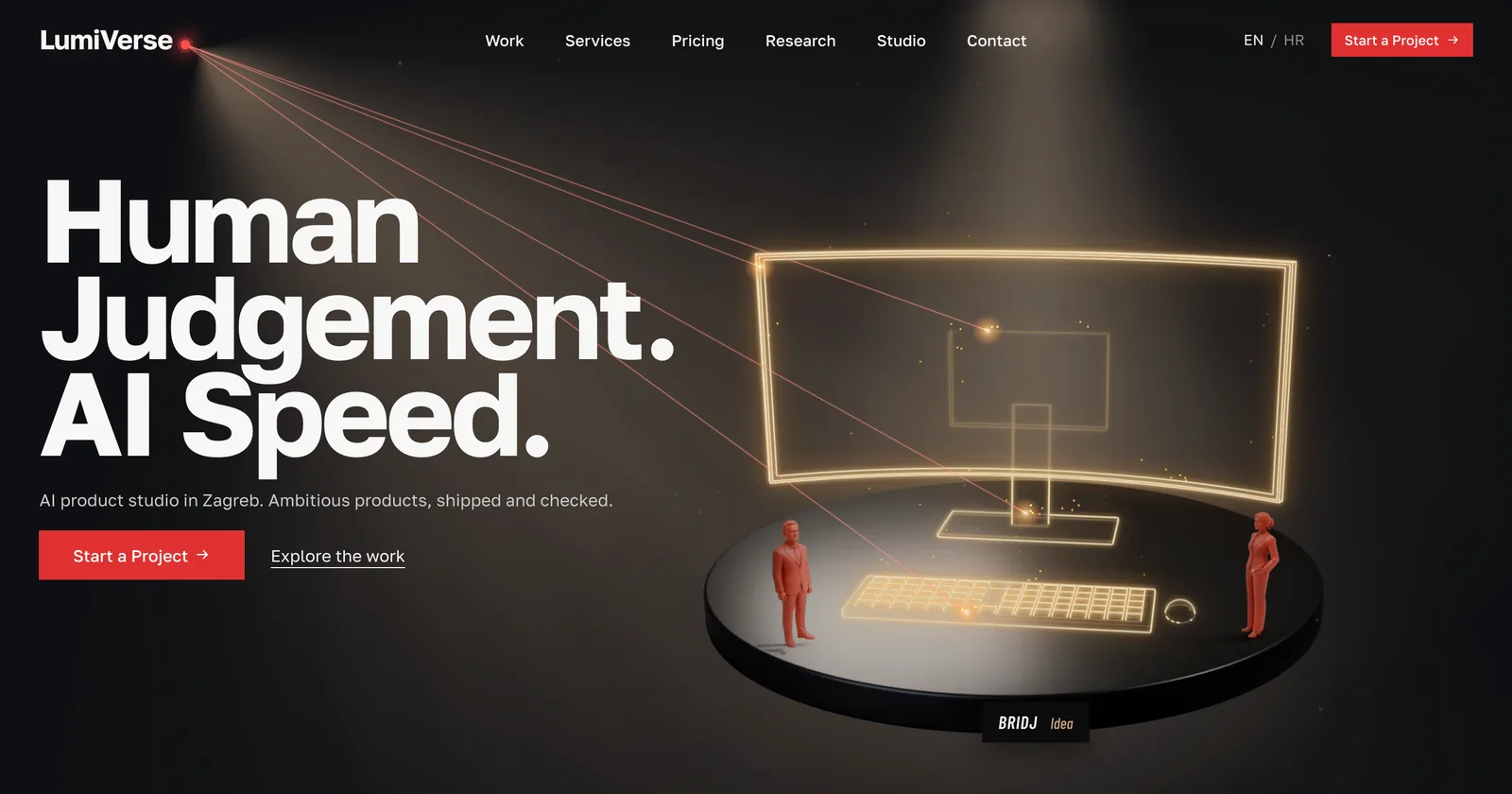 Four beams from the logo dot trace the Bridj workstation. The figures and the plinth are already there; the device is being drawn.
It looks like real-time 3D. It isn't. An earlier version of this hero ran live 3D in the browser, and one of the first review notes was about CPU load, not the design. So this one is pre-rendered stills plus a few hundred lines of canvas code, and nothing animates between cuts.
The work was done by an AI coding agent (Claude Code), driving Blender 5.2 through MCP. I reviewed each round in the browser and sent back notes. The notes are the interesting part, because each one exposed a different kind of mistake.
One camera, many layers
Everything starts in one Blender scene, rendered with Cycles at 1600×1100 from a single fixed camera. Each element is rendered as its own transparent layer:
- stage: the plinth and the figures, with their shadows.
- wire-<device>: only the device's edges, drawn by Blender's Freestyle line renderer, everything else transparent.
- solid-<product>: the finished device with a real screenshot on its screen.
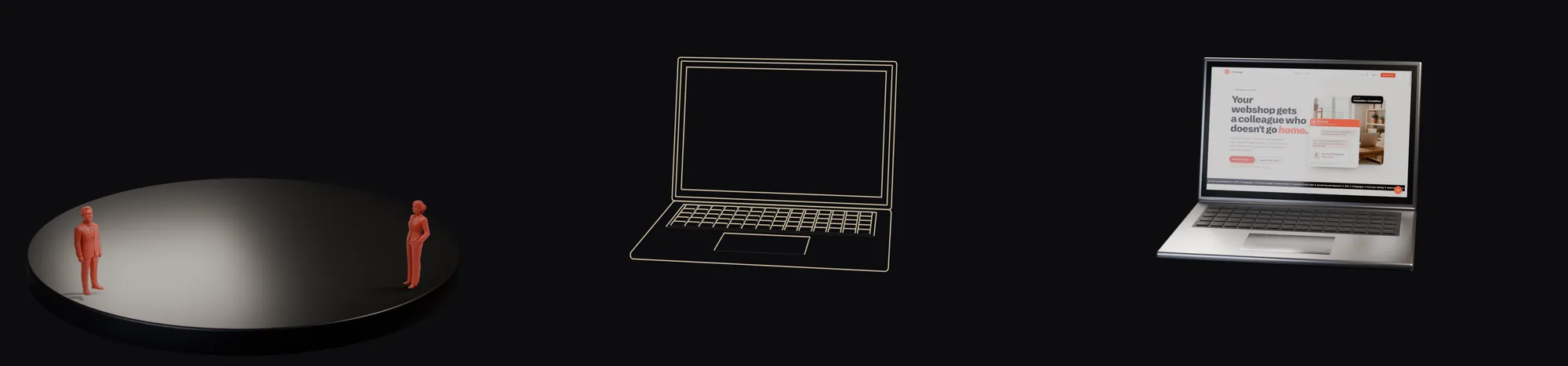 Stage, wireframe, solid. Because the camera never moves, the layers stack pixel for pixel in the browser.
The browser only animates the reveal. For the wireframe, four beams walk 2D paths projected from the real 3D edges, and the wire layer shows through a 26px stroke that follows them. For the solid, one cut line sweeps down and unclips the layer above it. One cycle is 1.15 seconds of tracing, 0.85 of cutting and 4.8 of holding.
Round one: gold, lighter, and more than one laptop
The first notes after the laptop-only version:
- The cutting laser is too heavy.
- The wireframe should glow gold, like the concept image, not salmon-white.
- Always the same laptop gets boring. Add a monitor and a workstation.
- The red figures are placeholders from the 3D era. Make them look real.
The laser lost weight in measured steps. The beam went from a 5px halo at 20% opacity plus a 1.1px core at 80%, to a 3px halo at 10% plus a 0.75px core at 50%. The cut line went from 2px at 90% to 1.2px at 60%. The burn point where a beam touches the work shrank from 20px to 15px and turned gold, matching the lines it leaves behind.
The gold is a Freestyle line colour, moved from (1.0, 0.86, 0.78) to (1.0, 0.72, 0.30), with hidden edges in deep amber at 45%. A three-step drop-shadow in CSS adds the glow.
The devices were modelled by script. The monitor is a 3.6 × 2.07 graphite panel tilted back 5°, on a neck and a plate foot. The workstation is harder. Its ultrawide panel curves on a radius of 5.2, and it's generated ring by ring so the screen's texture coordinates run exactly along the arc. The screen height is derived from the arc length, so the visible screen comes out at exactly 64:27, the real 21:9 ratio.
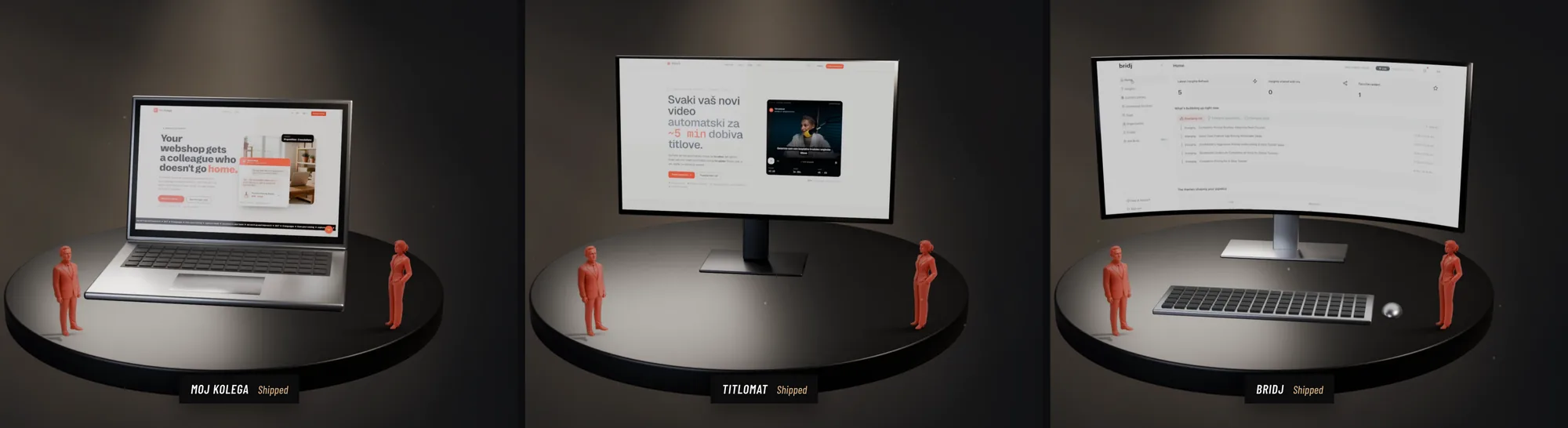 Each product on the device its users actually work on: a webshop owner's laptop, a creator's monitor, an analyst's ultrawide desk.
The screens show real product UI, never stretched. Titlomat was captured live at 1920×1080. For Bridj, a live capture of the marketing site at 2560px wide read as an empty white band. The fix was hiding in an existing case-study screenshot: the dashboard window inside it measured 2.33:1, almost exactly ultrawide. We cropped it out and used it as is.
Laser paths, generated instead of drawn
The first laptop had hand-picked outlines for the beams to follow. That doesn't scale to three devices, so the agent wrote one exporter. It takes every mesh edge that's a boundary or bends more than 0.5 radians, projects it through the render camera into pixels, and joins segments that share endpoints into lines. Then it orders them nearest-first, so a beam sweeps instead of jumping. Each beam owns a few parts of the device: frame, screen, stand, keyboard.
The check: the computed box for the laptop came out at (379, 221, 756×584). The old hand-measured box was (384, 224, 746×576). The paths for all three devices take 33 KB.
Figures from an image model
There was no 3D generator available, but our ComfyUI setup runs Qwen-Image. One prompt for "a miniature architectural scale-model figure in matte coral resin" returned a convincing product photo in about 16 seconds. A background-removal pass cut it out.
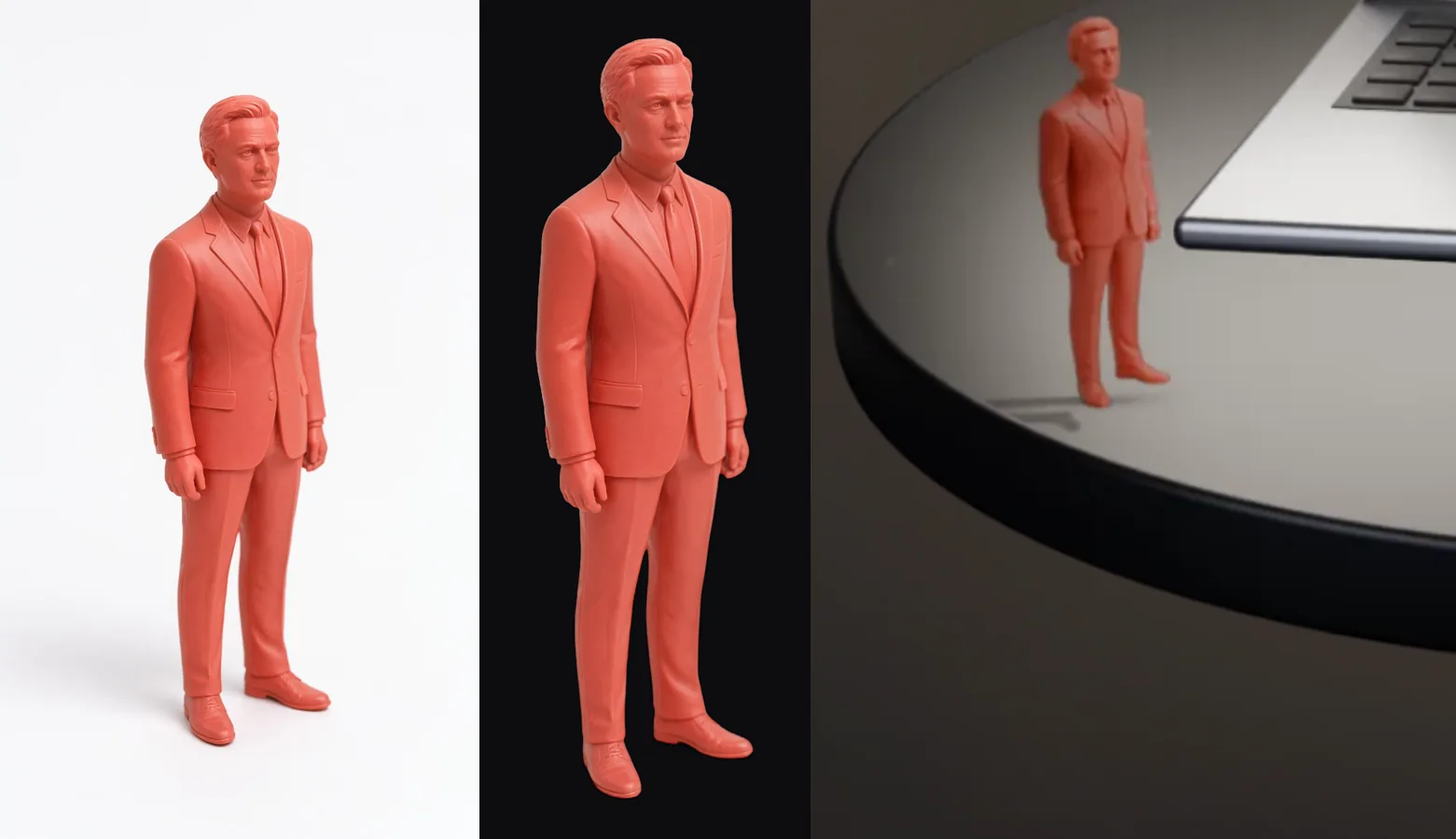 Generated photo, cut-out, in the scene. In Blender the figure is a flat card with an alpha channel, not a model.
The cut-out went into Blender as a flat card, not pasted onto the final image. That decision matters. In the scene, a card can cast a shadow and can cut a hole in the device layers, so a device behind a figure stays behind it after the browser stacks the layers.
Round two: the figure looked away
The next notes were short. The left figure overlaps the ultrawide, hovers over the plinth, and its shadow is weird. Also: turn the screens toward the viewer, and have the figures look at the devices, not away from them.
Three separate bugs were hiding in there.
The cards were mirrored. The card's rotation was computed as atan2(dy, dx) − 90°, which turned its back to the camera. The figure is drawn with an emission shader, which lights both sides, so nothing looked broken. It was simply mirrored, and the man looked away from the device he was supposed to be admiring. The fix was atan2(dx, −dy).
The hover was in the photo. The image model shot the figurine from slightly above, so in the picture the back shoe sits 40 pixels higher than the front one. That's 3% of the figure's height, about 3.4 cm in scene units. On a flat vertical card that becomes daylight under the back foot.
The overlap was a screen-space problem. Figures and devices don't touch in 3D, but they can overlap in the picture. So placement became a check, not a judgement: each figure's projected head must sit below the lowest projected point of every device it stands in front of.
The devices now turn 28° toward the camera, 8.6° past facing it head-on, so the screens lean toward the headline.
Round three: four attempts at a shadow
Then: the shadows under the figurines are missing or wrong.
This time the agent measured before touching anything:
- The man's shadow had nowhere to land. The key light is a spot at the upper right, so it throws shadows to the left. The man stands 0.27 units from the left rim. His shadow's tip lands at radius 3.6, and the plinth's radius is 2.75. Almost all of it falls off.
- The bright patch he stands in isn't light. The plinth is near-black (albedo 0.006) and glossy. The bright area is the mirror image of a 5×5 m fill panel, and no figurine can visibly shadow a reflection of a light that large.
Then it tried three fixes, and each one failed:
- Hidden copies of the cards turned toward the light, plus a lighter plinth so shadows could show. The black-gallery look was gone, and the man was still unshadowed.
- Moving the key light to the front so shadows fall back onto the plinth. They did, but the man's spot was still lit by the fill's reflection, so nothing showed there.
- Cycles light linking, so the fill panel stops reaching the plinth. That fixed the reflection and turned the plinth grey.
Each attempt traded away a look I had already approved, chasing physical correctness. The fix that shipped stopped chasing.
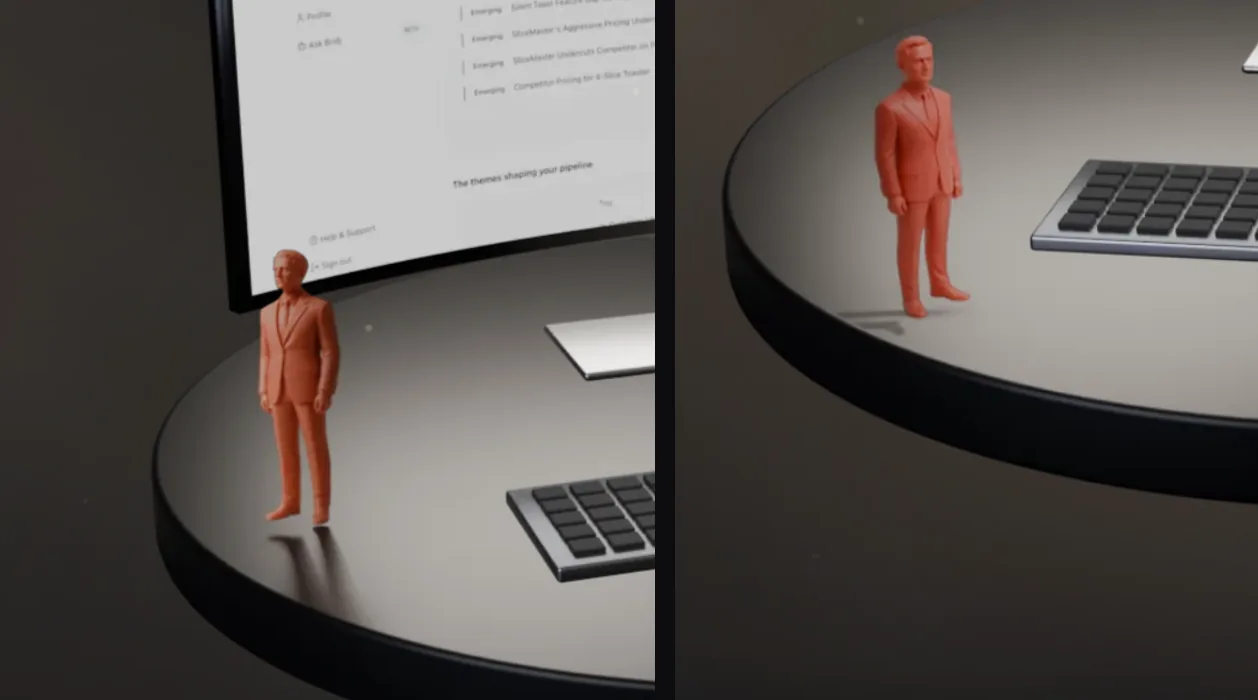 Before: a flat card's reflection and a gap under the back foot. After: a planar shadow along the real light direction, dropping off the rim.
A planar shadow is what a shadow geometrically is, so we built exactly that. Each figure's own silhouette is laid on the plinth along the real key-light direction, with the length from similar triangles: 1.29 units for the man and 0.75 for the woman. The silhouette is pre-blurred in four steps, from 3 to 36 pixels: sharp at the soles and softer toward the head, the way a real penumbra widens. It fades from 95% to 30% opacity. The shader clips it at the plinth's rim, so the man's shadow drops off the edge the way a real one would. The approved lighting is untouched.
One more bug turned up there. The soft contact shadow under each pair of feet had been capped at 13% opacity, because its falloff curve was applied after scaling instead of before. Reordered, it peaks at 55%, and the figures sit on the plinth instead of above it.
The pipeline bugs worth knowing
Two Blender behaviours cost us real time:
- Hidden objects keep their old positions. Objects in a collection hidden in the viewport don't get their world transform re-evaluated. The path exporter read the keyboard's old position after it had been moved, and the beams traced a keyboard that wasn't there. The exporter now unhides every device before reading.
- Cycles paints pixels black after eight transparent surfaces. The wireframe pass renders every surface transparent. At the monitor's neck, a ray crosses bezel, panel, housing and neck, more than the default limit of eight, and 1,431 pixels came out solid black. Raising the limit to 64 brought it to zero.
Both fixes now live in versioned scripts, one for the render and one for the path export. Every render resets every flag instead of inheriting whatever the last pass left behind.
What it costs
Seven WebP layers, about 290 KB in total, plus 33 KB of paths. No WebGL, and the page does nothing between cuts.
What transfers
- Render once, animate the reveal. Pre-rendered layers from a fixed camera give you real lighting and materials at the cost of a few images. The browser only has to move a mask.
- Generate data from the source, not by hand. The edge exporter turned "draw the laser paths" into one function that works for any device, and it checked itself against the old hand-made numbers.
- Check placement where the viewer sees it. Things that never touch in 3D can collide on screen. Projecting into pixels turned "looks crowded" into a number.
- Measure before fixing, then know when to stop. The shadow diagnosis was right on the first pass. The three lighting fixes were each physically reasonable, and each made the picture worse. A shadow only has to read as a shadow, so we built one.
- Image models are good props. A 16-second generation, placed as a card in a real scene, beat a hand-modelled low-poly figure on every review.